glTF in Unity optimization - 9. From file to native memory
This is part 9 of a mini-series.
TL;DR: One drive-by fix turned into two, and sped up editor imports of some glTF files by over 50%.
Introduction
While doing some other work in a certain area, my AI agent referred to a comment I made some time ago and offered a solution:
Data = File.ReadAllBytes(path);
// TODO: Is there a better way to load a file into a NativeArray, like AsyncReadManager?
m_ManagedNativeArray = new ReadOnlyNativeArrayFromManagedArray<byte>(Data);
NativeData = m_ManagedNativeArray.Array.AsNativeArrayReadOnly();
This code copies the content of a file into a managed byte[] and then ReadOnlyNativeArrayFromManagedArray wraps it so it can be accessed as a NativeArray<byte>.ReadOnly. To achieve that without creating a copy, the managed array gets pinned, locking the data in its current memory position. Unfortunately, this prevents the garbage collector from rearranging/compacting the memory.
The comment reveals that I already had a gut feeling of how this could be improved, but I must've been short on time and forgot about it.
I asked the agent to look into that, which immediately delivered the solution in a single ~70-line class in the form of NativeFileReader.
Benchmark
Naturally I wanted to verify the reduced GC memory allocation and see whether it changed performance meaningfully, not expecting drastic differences. I wanted to test a glTF asset that consists of multiple files and has a considerable size, so I picked ABeautifulGame from Khronos' glTF-Sample-Assets (the uncompressed, non-binary variant with 33 JPEG textures in separate files).
NativeFileReader
Importing ABeautifulGame on a MacBook Pro M3 Max:
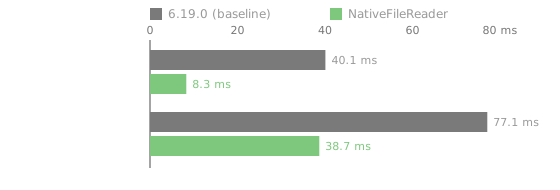
GC allocation went from 28.5 MB (which is roughly the size of all files) to just 21.4 kB, which is not to say it uses much less memory. It was merely transferred to native memory, which is explicitly released instead of pinned and subsequently collected.
I was blown away by how much faster AsyncReadManager was, but something else was very suspicious.
Load all the textures
The profiler showed that 35 files were loaded during import, not just the glTF JSON and buffer .bin files, but also all JPEG textures. This is odd knowing that in the Editor glTFast relies on Unity's default texture importer instead of loading texture files directly. I read the agent's summary and sure enough, it also pointed out the other, arguably bigger problem and provided a solution: SyncTextureLoader's constructor loaded texture data for no reason, because it calls its base class SyncFileLoader's constructor by accident. The two-line fix was to not do that stupid thing.
Here's the final result (that landed in 6.20.0):
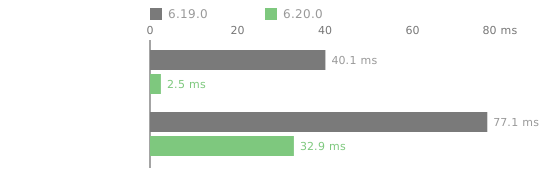
GC allocation is now 1.2 kB, but the real saving is that ~18 MB of JPEGs are not fetched into RAM for no reason.
Conclusion
Removing stupid code has led to some great performance improvements more often than I'd like to admit. It has happened to me multiple times recently that AI pointed out some hidden, low-hanging fruit while it was doing something different in the same area, and I'm loving it!
For a long time I have been skeptical about using agentic coding. Towards the end of 2025 more and more smart engineers I trust and respect reported about their AI journey (some 24/7), so I finally gave it a try over the Christmas holidays. Subsequently, I started incorporating it into my professional life at the beginning of 2026. Although I still have concerns due to ethical issues, environmental issues, and the potential negative socio-economic impact, as a tool it is pretty damn impressive and empowering.
Next up
We're working hard on glTFast 7, the first big changes after 4 years. There's a lot I'd like to say about it, so stay tuned!
Follow me on Mastodon, Bluesky or subscribe to the feed to not miss updates.
If you liked this read, feel free to